

The right thermal printer depends on what you print, how much you print, how long the output must last, and where the printer operates.
·Retail receipts and restaurant orders: POS thermal printer
·4×6 shipping and product labels: Desktop thermal label printer
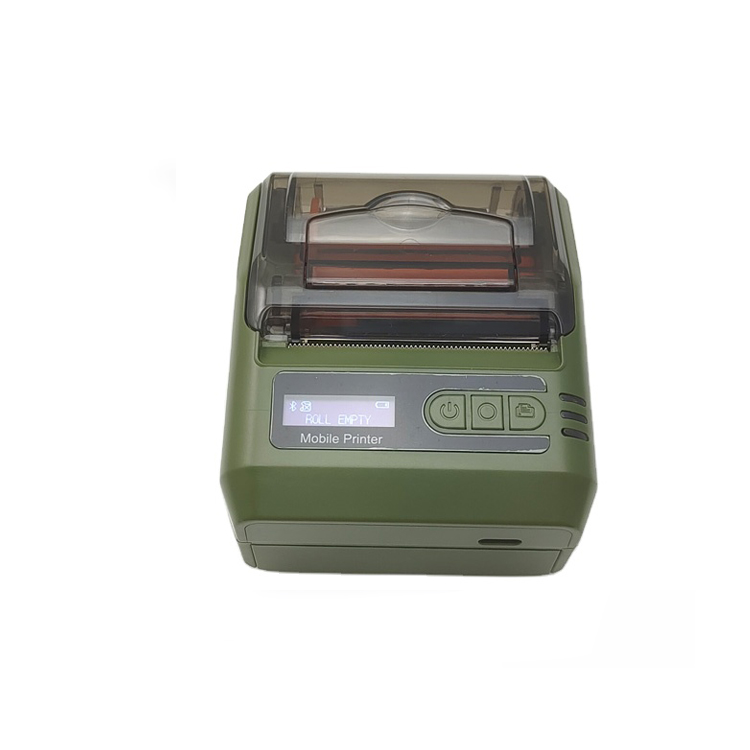
·Mobile receipts, tickets, and labels: Portable thermal printer
·Short-life output: Direct thermal printing
·Durable labels: Thermal transfer printing
For commercial and wholesale purchasing, printer type is only the starting point. Media compatibility, workload, connectivity, command language, certifications, warranty, spare parts, OEM/ODM capability, and supplier consistency also need to be checked before a bulk order.
The selection process is straightforward:
Application → Printer Type → Printing Technology → Specifications → Testing → Supplier

What Is a Thermal Printer and How Does It Work?
A thermal printer uses a heated printhead to create text, barcodes, graphics, receipts, or labels. Unlike inkjet printers, it does not use liquid ink cartridges.
Two printing technologies are commonly used.
Direct Thermal Printing
Direct thermal printing creates an image directly on heat-sensitive paper or labels. It does not require a ribbon.
It is commonly used for:
·POS receipts
·Shipping labels
·Tickets
·Temporary identification labels
·Short-term product labels
The main limitation is durability. Direct thermal output can darken or fade when exposed to prolonged heat, sunlight, or certain chemicals.
Thermal Transfer Printing
Thermal transfer printing uses a ribbon to transfer an image onto the label material.
It is commonly used for:
·Product labels
·Asset tags
·Durable barcodes
·Compliance labels
·Long-life identification labels
The choice between direct thermal and thermal transfer should be based on the required label life, media material, and operating environment.
Direct Thermal vs. Thermal Transfer
|
Factor |
Direct Thermal |
Thermal Transfer |
|
Ribbon |
Not required |
Required |
|
Typical output life |
Shorter |
Generally longer |
|
Media |
Heat-sensitive media |
Paper and synthetic media |
|
Common uses |
Receipts, shipping labels, tickets |
Product, asset and durable barcode labels |
|
Heat / sunlight resistance |
More limited |
Generally better with suitable media |
|
Chemical / abrasion resistance |
More limited |
Generally better with suitable ribbon and media |
|
Consumables |
Media |
Media + ribbon |
Direct thermal is commonly used when a relatively short service life is acceptable. Thermal transfer is generally preferred when the printed image needs greater resistance to handling or environmental exposure.
Thermal Printer Types: Which One Fits Your Business?
When people compare thermal printer types, they are usually comparing two different things: the printer's form factor and application, and the printing technology it uses.
By application and form factor, common business categories include POS receipt printers, desktop label printers, and mobile thermal printers.
By printing technology, thermal printers are mainly divided into direct thermal and thermal transfer.
These two classifications work together. For example, a desktop label printer may use direct thermal technology for shipping labels, while another label printer may use thermal transfer for longer-lasting product or asset labels.

1. POS Thermal Printers
POS thermal printers are designed for receipts, order tickets, and transaction-related printing at retail and service counters.
Choose a POS thermal printer when the workflow centers on receipts, customer orders, or fixed counter printing.
For businesses deploying printers across multiple locations, standardizing the interface, paper width, command language, and configuration can simplify procurement and replacement.
2. Desktop Thermal Label Printers
Desktop thermal label printers are compact models designed for routine label printing from offices, packing stations, retail counters, and smaller warehouses.
For standard 4×6 shipping labels, a 203 dpi direct thermal printer is often sufficient. Higher resolution may be useful when labels contain smaller text or dense barcode elements.
Choose a desktop model when the workload is moderate and the printer needs to fit a fixed workstation or packing area.
3. Mobile & Portable Thermal Printe
Mobile thermal printers are designed for printing away from a fixed workstation.
Choose a portable thermal printer when employees need to print at the point of activity instead of returning to a fixed printer.


What Should You Define Before Buying Thermal Printers?
Before requesting quotations, prepare a basic specification sheet.
Application
Define exactly what the printer will produce:
·Receipts
·Shipping labels
·Product labels
·Barcodes
·Asset tags
·Tickets
·Order tickets
Media
Provide:
·Label or paper width
·Length
·Material
·Thickness
·Core diameter
·Roll diameter
·Gap or black-mark requirements
Workload
Provide:
·Average daily volume
·Peak hourly volume
·Monthly volume
·Average print-job size
·Number of shifts
Environment
Specify whether the printer will operate in:
·Office
·Retail counter
·Restaurant
·Warehouse
·Packing station
·Outdoor or mobile environment
Connectivity and Printing Workflow
Confirm:
·USB
·Ethernet
·Wi-Fi
·Bluetooth
·Serial
·Required command language
·Operating system
·Existing POS, ERP, WMS, or shipping workflow
This information helps suppliers recommend a hardware configuration based on actual requirements rather than generic model specifications.

Direct Thermal vs. Thermal Transfer: Which Technology Should You Use?
After choosing the printer category, select the printing technology according to the required output life.
Choose Direct Thermal When:
The label or receipt has a relatively short service life.
·No ribbon is preferred.
·Simple media handling is important.
·The application involves receipts, tickets, or shipping labels.
·Labels are mainly used indoors.
Choose Thermal Transfer When:
·Labels must remain readable for longer periods.
·The application involves abrasion or frequent handling.
·Labels may be exposed to moisture, chemicals, or sunlight.
·Synthetic media is required.
·Durable product, asset, or compliance labels are needed.
A useful starting rule is:
Short-life output → Direct Thermal
Long-life or demanding labels → Thermal Transfer
However, the final choice should always be tested with the actual media. Label coating, adhesive, ribbon type, print darkness, and environmental exposure can all affect the result.
What Thermal Printer Specifications Should You Compare?
Once the printer type and technology are clear, compare the specifications that affect actual operation.
Print Resolution: 203, 300
Start with the smallest text and barcode element on the actual label. If a 4×6 shipping label contains standard barcodes and readable text, 203 dpi is often sufficient. Move to 300 dpi when the label layout becomes denser or smaller elements need cleaner reproduction.
203 dpi is commonly suitable for:
·4×6 shipping labels
·Standard barcodes
·Receipts
·General product labels
300 dpi can be useful for:
·Smaller text
·Dense barcodes
·Detailed product labels
·Fine graphics
For most standard shipping applications, 203 dpi is a practical starting point. Move to 300 or 600 dpi only when the actual label design requires it.
Print Speed and Duty Cycle
Print speed and duty cycle measure different things.
Print speed describes how quickly the printer can produce output under specified conditions.
Duty cycle describes the workload the printer is designed to handle.
A printer with a high maximum speed may still be unsuitable for continuous multi-shift printing.
Do not compare print speed without comparing print width, media type, print density and workload. A rated speed is not the same as the number of labels your operation can realistically process per hour.
For procurement, compare the rated specifications with:
·Labels per day
·Peak labels per hour
·Average print-job size
·Number of operating shifts
·Expected continuous print runs
Connectivity
Common interfaces include:
·USB
·Ethernet
·WiFi
·Bluetooth
·RS232
USB is often suitable for a single workstation. Ethernet is useful for shared network printers. Bluetooth and Wi-Fi are commonly used in mobile workflows.
Choose the interface based on the actual deployment rather than simply selecting the model with the most connection options.
Command Languages
Thermal printers may support command languages such as:
·ESC/POS
·ZPL / ZPL-II
·TSPL
·EPL
·CPCL
·DPL
The required command language depends on the existing printing workflow.
For example, receipt systems commonly use ESC/POS, while many label-printing workflows use ZPL or other label-printer command languages.
For procurement, “compatible” is not enough. Ask which command language or emulation is supported, whether the required commands are implemented, and whether the supplier can test your actual print file.
Media Compatibility
Check:
·Label width
·Printable width
·Roll diameter
·Core size
·Media thickness
·Paper or synthetic material
·Gap sensing
·Black-mark sensing
·Continuous media
·Direct thermal compatibility
·Thermal transfer compatibility
Two labels with identical dimensions can behave differently because of their coating, liner, adhesive, and thickness.
For this reason, testing the actual media is more reliable than comparing dimensions on a specification sheet alone.
Durability and Wear Parts
For commercial deployments, also check the expected life and replacement process for:
·Printhead
·Platen roller
·Auto-cutter
·Sensors
·Other wear parts
Ask the supplier for rated component life, replacement cost, spare-part availability, and maintenance requirements.

Choose a Thermal Printer by Application
The easiest way to narrow the options is to connect the application with the printer type and technology.
|
Application |
Printer Type |
Technology |
Key Requirements |
Why |
|
Retail receipts |
POS |
Direct thermal |
58/80mm, cutter, connectivity |
Fast counter printing |
|
4×6 shipping labels |
Desktop label |
Direct thermal |
203 dpi, media compatibility |
Short-life shipping output |
|
Product labels |
Desktop / high-duty |
Direct or transfer |
DPI, media, label life |
Depends on label durability |
|
Warehouse labels |
High-duty |
Direct or transfer |
Workload, media capacity |
Sustained printing |
|
Asset labels |
High-duty |
Thermal transfer |
Durable media, resolution |
Longer service life |
|
Field delivery |
Mobile |
Direct thermal |
Battery, Bluetooth |
Printing away from desk |
The selection sequence is:
Application → Printer Type → Technology → Specifications → Sample Test
This prevents a common procurement problem: selecting a printer because of one attractive specification before confirming that the printer category actually fits the workflow.
How Does Thermal Printer TCO Affect the Choice?
The purchase price is only one part of the cost.
For a larger deployment, compare:
Printer + Media + Ribbon + Wear Parts + Maintenance + Downtime + Freight + Warranty/RMA
Hardware Cost
Include the printer, power supply, required accessories, and optional components such as cutters or external media holders.
Consumables
Compare:
·Cost per roll
·Labels per roll
·Cost per 1,000 labels
·Annual media consumption
·Ribbon cost for thermal transfer printing
Maintenance
Consider:
·Printhead replacement
·Platen replacement
·Cutter replacement
·Cleaning
·Spare parts
·Technical support
·Printer replacement
Downtime
A low-cost printer can become more expensive if it causes frequent media errors, maintenance interruptions, or replacement delays.
For bulk procurement, compare the expected operating cost using the same workload and media assumptions for every shortlisted model.
How to Evaluate a Thermal Printer Supplier
Quality Control
Ask about:
·Incoming material inspection
·Production testing
·Finished-product inspection
·Batch consistency
·Defect control
·Repeat-order consistency
Warranty and RMA
Confirm:
·Warranty period
·RMA process
·Technical support
·Spare-parts availability
·Printhead and cutter replacement
·Responsibility for return shipping
OEM/ODM Capability
For distributors, wholesalers, importers, and brand owners, check whether the supplier can support:
·Logo customization
·Housing options
·Packaging
·Manuals
·Firmware configuration
·Accessories
·Custom labels
·MOQ requirements
·Sample development
·Production lead time
For OEM/ODM projects, also clarify which specifications remain standardized across repeat production.
Compliance
Certification requirements depend on the destination market and exact configuration.
Depending on the market, buyers may need to evaluate documentation such as:
·CE
·FCC
·RoHS
·REACH
·BIS
·Other local conformity requirements
Always verify that the documentation corresponds to the exact model and configuration being purchased.

What Should You Test Before a Bulk Thermal Printer Order?
A successful sample test should use the same conditions expected in production.
Test:
·Actual paper or label material
·Actual label dimensions
·Actual print files
·Required command language
·Intended interface
·Network environment
·Expected print density
·Peak workload where practical
For label printers, check:
Print quality → Barcode readability → Media feeding → Calibration → Position accuracy → Connectivity → Continuous operation
For POS printers, check:
Receipt quality → Print speed → Cutter operation → Paper feeding → Interface stability → POS compatibility
A sample that works with a generic test label does not necessarily prove that the printer will work with your production workflow.
If you have any interest or query during the selection or use of any thermal printer, please Click the link below send your inquiry to our official mail (admin@minj.cn) directly! MINJCODE is committed to the research and development of printer technology and application equipment, our company has 15 years of industry experience in the professional fields, and has been highly recognized by the majority of customers!
Common Thermal Printer Buying Mistakes
Choosing Only by Purchase Price
A lower hardware price can be offset by higher consumable, maintenance, spare-part, or downtime costs.
Choosing DPI Before the Application
Higher resolution is useful only when the label design requires it.
Ignoring Duty Cycle
A fast printer is not automatically suitable for continuous multi-shift operation.
Ignoring Media Compatibility
Always test the actual media rather than relying only on width and roll dimensions.
Skipping Integration Testing
Confirm command language, interface, drivers, and actual print files before bulk deployment.
Buying Without Sample Testing
A sample test can identify media, calibration, connectivity, and workflow problems before production orders.
Forgetting Spare Parts
For larger deployments, clarify the availability and replacement cost of printheads, platens, cutters, and other wear parts.
Thermal Printer FAQs
What are the main types of thermal printers?

The four common business categories are POS thermal printers, desktop thermal label printers, high-duty label printers, and mobile thermal printers. The right type depends on the application, workload, environment, and mobility requirements.
Does a faster thermal printer always handle a higher workload?
No. Rated print speed and workload capacity are different specifications. A printer may have a high maximum speed but still be unsuitable for sustained printing. Compare rated speed, recommended workload, print width, media type, and operating schedule together.
Which thermal printer is suitable for warehouse labels?
The answer depends on workload and label durability. High-duty label printers are generally considered when printing volumes are sustained or multi-shift. Thermal transfer may be appropriate when warehouse or asset labels need longer service life.
What should I check before buying thermal printers in bulk?
Define the application, printer type, technology, media, workload, environment, connectivity, and printing workflow. Then compare TCO, certifications, warranty, spare parts, supplier capability, and sample-test results.
What information should I send a supplier for a thermal printer quotation?
Provide the application, media dimensions, roll or core size, average and peak volume, required resolution, connectivity, command language, operating system, environment, target quantity, and any OEM/ODM requirements. A sample label or print file can make the evaluation more accurate.
Contact Us
Choosing a thermal printer starts with the job the printer must perform.
Define the application, media, workload, environment, and required output life first. Then select the printer type and printing technology that match those requirements. Specifications such as DPI, speed, connectivity, command language, and media support should be checked against the actual workflow rather than compared in isolation.
For commercial, wholesale, or OEM/ODM projects, the final check should go beyond the sample unit. Verify production consistency, compliance documents, spare parts, warranty terms, and the supplier's ability to maintain the same configuration across repeat orders.
Phone: +86 07523251993
E-mail: admin@minj.cn
Official website: https://www.minjcode.com/
If You Are in Business, You May Like


Recommend Reading
Ready to Source Bulk Thermal Printers?
Want to Test Your Workflows First? Request standard samples or customized OEM prototypes for your network environment.
Post time: Sep-21-2026