

Thermal, inkjet, and laser printers are designed for different printing jobs. Thermal printers are commonly used for receipts, barcode labels, shipping labels, and roll media; inkjet printers suit color documents and images; laser printers are commonly used for fast sheet-based office printing.
From our experience manufacturing thermal printing hardware, we recommend choosing based on output, media, workload, compatibility, environment, and total cost of ownership (TCO) rather than comparing printer specifications alone.
Key Takeaways
·Thermal: receipts, barcode labels, shipping labels, and roll media.
·Inkjet: color documents, graphics, and photos.
·Laser: fast sheet-based office documents.
·Barcode quality depends on more than DPI: media, contrast, size, alignment, and print consistency also matter.
·Commercial buyers should evaluate consumables, maintenance, downtime, compatibility, and supplier capability.
Side-by-Side Printer Comparison
Thermal vs Inkjet vs Laser: Quick Comparison
The three technologies solve different printing problems.
Thermal printing is commonly associated with receipts, labels, and barcode media. Inkjet focuses on liquid-ink printing and is widely used for color documents and images. Laser printing uses toner and is commonly optimized for sheet-based office documents.
For commercial procurement, the useful question is not simply “Which printer is better?”
Instead, ask:
What are you printing, on what media, at what volume, and for how long must the output remain usable?
|
Factor |
Thermal Printer |
Inkjet Printer |
Laser Printer |
|
Printing method |
Heat-based printing |
Liquid ink droplets |
Toner and electrostatic imaging |
|
Main consumables |
Thermal media and/or ribbon |
Ink cartridges or ink systems |
Toner and imaging components |
|
Typical output |
Receipts, labels, barcodes, tags |
Documents, graphics, photos |
Documents, reports, graphics |
|
Roll media |
Strong fit |
Limited |
Limited |
|
Sheet paper |
Model dependent |
Strong fit |
Strong fit |
|
Color printing |
Generally limited |
Strong |
Available on color models |
|
Barcode labels |
Strong fit |
Possible |
Possible |
|
Typical maintenance |
Printhead, platen, sensors, media path |
Ink and printhead system |
Toner, drum, fuser and related components |
|
Common applications |
POS, retail, logistics, labeling |
Office, graphics, photos |
Office and document printing |
Where Each Printer Technology Fits Best
·Thermal printers make sense when your workflow depends on receipts, shipping labels, inventory labels, product identification labels, tags, or other compatible thermal media.
·Inkjet printers are useful when color, photographs, graphics, or flexible sheet-media printing are important.
·Laser printers are commonly used for office documents, reports, invoices, forms, and other sheet-based printing.
The right technology depends on what you actually need to print.

How the Three Printing Technologies Work
The fundamental difference between these technologies is how they create an image.
Understanding the printing mechanism helps you evaluate consumables, media compatibility, maintenance, and output durability.
Thermal Printers: Direct Thermal and Thermal Transfer
Thermal printers use heat to create printed output.
There are two main thermal printing methods.
Direct thermal printing uses a thermal printhead to heat specially coated media. The heated areas change color, so the printer does not require an ink cartridge or toner.
Direct thermal printing is commonly used for:
·Shipping labels
·Delivery labels
·Receipts
·Temporary inventory labels
·Tickets
·Short-term identification labels
Thermal transfer printing uses a ribbon between the printhead and the media. Heat transfers material from the ribbon onto the label surface.
Thermal transfer can be useful when the printed information needs greater resistance to environmental exposure or longer-term handling.
The important point is that printer technology and media must be evaluated together.
A thermal printer does not determine label life by itself. The media, printing method, environment, handling, and expected service life all affect the result.
Inkjet Printers: Liquid Ink and Printheads
Inkjet printers create images by depositing small droplets of liquid ink onto paper or other compatible media.
Depending on the printer, inkjet technology can support:
Black-and-white documents
·Color documents
·Graphics
·Photos
·Marketing materials
·Specialty media
The main advantage is flexibility in color and image reproduction.
However, the ink system also introduces consumable and maintenance considerations that are different from direct thermal printing.
Laser Printers: Toner, Drum, and Fusing
Laser printers use an electrostatic imaging process to transfer toner onto paper. The toner is then bonded to the media through a fusing process.
Laser printers are widely used for:
·Office documents
·Reports
·Invoices
·Forms
·Business correspondence
·High-volume document printing
Their workflow is generally optimized around sheet media rather than the roll-based labels and receipts commonly associated with thermal printing.

Print Quality, DPI, and Barcode Readability
DPI Does Not Tell the Whole Story
While print resolution—such as 203 DPI versus 300 DPI—measures dot density, high resolution alone does not guarantee a scannable barcode. Factors like element scaling, print contrast, and dot placement precision dictate whether a scanner can read small text, dense data matrices, or complex QR codes cleanly.
Barcode Scannability Depends on More Than DPI
Achieving reliable barcode readability requires controlling multiple variables simultaneously:
·High optical contrast between bars and spaces.
·Maintaining adequate quiet zones around the barcode.
·Matching media quality and ribbon composition to prevent bleeding.
·Ensuring proper printhead pressure, alignment, and regular maintenance.
Color Printing Capability
Standard direct thermal printing is generally monochrome (typically black on white). Thermal transfer can introduce different ribbon colors, but true multi-color graphic printing is native to inkjet and specific color laser models.

Media Compatibility: Labels vs Paper
The media you need to print is one of the fastest ways to identify the right technology.
Thermal Media
Thermal printers are designed for media such as:
·Receipt paper
·Shipping labels
·Inventory labels
·Product labels
·Price labels
·Tags
·Continuous and die-cut labels
Before ordering, confirm label width, length, roll diameter, core size, material, media thickness, and gap or black-mark configuration.
For mobile applications, also consider the required roll size, printer dimensions, and battery capacity.
Sheet Paper
Inkjet and laser printers are generally better suited to A4 or Letter-size documents such as reports, contracts, invoices, and presentations.
If your business prints both shipping labels and office documents, you do not necessarily need one technology to handle everything.
For many e-commerce and fulfillment workflows, a practical setup is thermal printing for shipping/barcode labels plus laser or inkjet printing for A4 documents.

Speed, Workload, and Real-World Throughput
Maximum Print Speed vs Real-World Throughput
Advertised maximum print speeds do not reflect real-world throughput. Job processing time, data transmission, label formatting complexity, and pause intervals between batches heavily influence actual daily output.
Peak Workload vs Average Workload
Evaluating printing operations requires assessing peak periods—such as morning shipping rushes or end-of-shift inventory labelling—to ensure the device handles maximum labels per hour without thermal throttling or hardware strain.
Duty Cycle and Maintenance Requirements
Every printing system operates best within a recommended commercial workload. Respecting these duty limits minimizes premature wear on moving parts, printheads, and rollers.
Total Cost of Ownership
Printer purchase price is only one part of the cost.
A practical TCO calculation is:
TCO = Hardware + Consumables + Maintenance + Replacement Parts + Downtime + Reprints
Consumables
Thermal printing may use thermal media and, for thermal transfer, ribbons.
Inkjet uses ink, while laser printers use toner and potentially imaging components.
Compare:
·Cost per roll or cartridge
·Labels per roll
·Ribbon consumption
·Toner yield
·Media waste
·Reprints
Third-party consumables should also be evaluated for compatibility, print quality, barcode readability, and supply consistency.
Maintenance and Downtime
Thermal printers may require attention to the printhead, platen roller, sensors, and media path.
Laser and inkjet printers have their own maintenance requirements.
For commercial buyers, downtime and failed labels can cost more than a small difference in hardware price.
Which Printer Fits Your Application?
Retail POS
Thermal printers are commonly used for:
·Receipts
·Price labels
·Shelf labels
·Product identification
·Inventory labels
For general A4 documents, laser or inkjet technology may be more appropriate.
For fixed POS deployments where wider receipts and higher paper capacity are required, an 80mm thermal printer can be evaluated based on print width, connectivity, cutter configuration, and expected workload.
Warehouse, Shipping, and Inventory
Thermal printing is commonly used for shipping, receiving, picking, packing, and inventory labels.
A typical shipping workflow may use a 4 × 6-inch label, but always confirm the actual media specifications before selecting hardware.
For broader labeling requirements, evaluate a thermal label printer solution based on label size, media, DPI, connectivity, and workload.
Office and Administrative Printing
Laser printers are commonly used for fast sheet-based documents.
Inkjet printers can be useful when color graphics or photographs are important.
Mobile and Field Printing
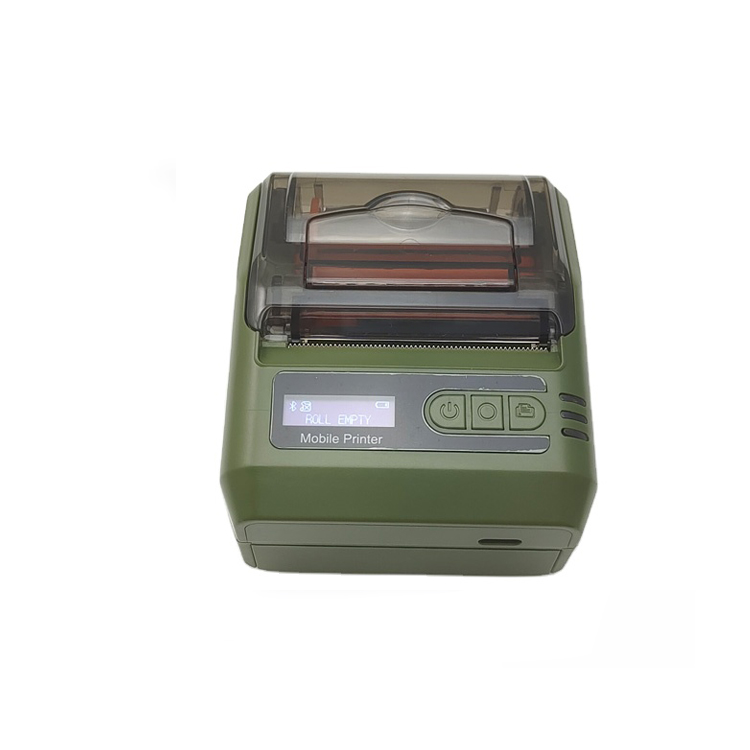
When labels or receipts must be printed away from a fixed workstation, a portable thermal printer can be considered.
For mobile deployments, evaluate print width, media size, battery capacity, USB/Bluetooth connectivity, and the actual operating workflow.

B2B Thermal Printer Sourcing Guide
For distributors, wholesalers, importers, system integrators, and project buyers, printer selection is only part of the purchasing decision.
In projects that combine checkout terminals, scanning and receipt printing, buyers may also evaluate the broader POS hardware manufacturer capability, including interface consistency, customization, quality control, and production capacity.
Before a bulk order, test:
·Actual label and media
·Barcode format
·Print file
·Interface
·Operating system
·Scanner compatibility
Also confirm the supported printer language and interface. Depending on the model, thermal printers may support command environments such as ZPL, EPL, TSPL, or CPCL, but compatibility must be verified for the specific configuration.
OEM/ODM Requirements
Commercial projects may require:
·Custom branding
·Housing or packaging changes
·Firmware configuration
·Interface configuration
·Language requirements
·Model adjustments
Working directly with a specialized thermal printer manufacturer can simplify sample validation, production consistency, customization, and technical coordination compared with sourcing through multiple intermediaries.
At MINJCODE, our focus is thermal printing hardware manufacturing and OEM/ODM supply. We recommend approving the actual configuration and sample before moving to larger production.

Thermal vs Inkjet vs Laser: Decision Checklist
|
If you need... |
Consider... |
|
POS receipts |
Thermal printer |
|
Shipping labels |
Thermal printer |
|
Barcode labels |
Thermal printer |
|
Roll-based labels |
Thermal printer |
|
Portable printing |
Portable thermal printer |
|
Color photos |
Inkjet |
|
Color documents |
Inkjet or color laser |
|
A4/Letter documents |
Laser or inkjet |
|
High-volume office documents |
Laser |
|
Long-life barcode labels |
Thermal transfer + suitable media |
|
Short-term shipping labels |
Direct thermal + suitable media |
This is not a universal ranking. The appropriate choice depends on your output, media, workload, environment, compatibility, and TCO.
If you have any interest or query during the selection or use of any thermal printer, please Click the link below send your inquiry to our official mail (admin@minj.cn) directly! MINJCODE is committed to the research and development of printer technology and application equipment, our company has 15 years of industry experience in the professional fields, and has been highly recognized by the majority of customers!
FAQ

Is a Thermal Printer Better Than an Inkjet Printer?
Neither is universally better. Thermal printers are commonly suited to receipts, labels, tags, and compatible roll media, while inkjet printers provide greater flexibility for color documents, graphics, and photos.
Is Thermal Printing Cheaper Than Laser Printing?
It depends on the application and consumables. Compare hardware, media, toner or ribbon, maintenance, downtime, and reprints rather than purchase price alone.
Can Thermal Printers Print Color?
Standard direct thermal printing is generally monochrome. Thermal transfer can use different ribbons and media, but it is not equivalent to full-color inkjet or color laser printing.
Are Thermal Printers Good for Barcode Labels?
Yes. They are widely used for barcode labels. However, readability also depends on barcode size, quiet zone, contrast, media quality, DPI, alignment, and print consistency.
Do Thermal Printers Need Ink or Toner?
Direct thermal printers do not. They use heat-sensitive media. Thermal transfer printers use a ribbon.
Can One Printer Handle Every Application?
Usually not. Thermal, inkjet, and laser technologies are optimized for different media and outputs. Using different printer technologies for different workflows can be more practical than forcing one device to handle everything.
Contact Us
Thermal, inkjet, and laser printers solve different printing requirements.
·Thermal printing is commonly suited to receipts, barcode labels, shipping labels, inventory labels, and roll-based media.
·Inkjet printing is useful for color output, graphics, photos, and flexible paper media.
·Laser printing is commonly used for fast sheet-based office documents.
For business procurement, work through:
Output → Media → Technology → Volume → Resolution → Connectivity → Compatibility → Environment → TCO
From our experience manufacturing thermal printing hardware, the most reliable selection process is to test the actual label, media, barcode format, printer configuration, and connection method before a larger order.
Phone: +86 07523251993
E-mail: admin@minj.cn
Official website: https://www.minjcode.com/
If You Are in Business, You May Like


Recommend Reading
Need a Thermal Printer for Your Project?
Share your label or receipt size, media type, print volume, connectivity, application, and expected order quantity. Our team can help you evaluate the appropriate thermal printing hardware configuration.
Post time: Sep-20-2026