
Food Truck POS Hardware for OEM & Wholesale Projects
MINJCODE supplies POS terminals and related hardware for food truck equipment projects, including wholesale distribution, private-label programs, and integration with third-party POS software.
If you are a POS software provider, system integrator, distributor, or procurement team, we can help you review available hardware models, interfaces, peripheral requirements, and customization options before sample testing or bulk ordering.
MINJCODE factory video
MINJCODE supplies touchscreen POS terminals and related hardware for distributors, software providers, and system integrators.
For food truck equipment projects, we recommend confirming the terminal configuration, operating system, peripheral interfaces, installation requirements, and sample acceptance criteria before placing a bulk order.
Our factory video provides an introduction to MINJCODE. For supplier qualification, you can also request available model-specific specifications, quality documentation, and information about applicable OEM/ODM options.
Food Truck POS Hardware Options
Food truck projects don‘t all require the same POS terminal. A fixed checkout counter may accommodate a larger touchscreen, while a compact serving window may require a smaller footprint or an integrated printer.
We recommend starting with the available terminal configurations and checking each model against your software and installation requirements.
Hot Models

|
Type |
MJ-T156 |
|
Optional Color |
Black |
|
Main Board |
1900MB |
|
CPU |
Intel Celeron Bay Trail-D J1900 quad core 2.0 GHZ |
|
Memory Support |
DDRIII 1066/1333*1 2GB(up to 4GB) |
|
Hard Driver |
DDR3 4GB (default) |
|
Internal Storage |
SSD 128GB (default) Optional:64G/128G SSD |
|
Primary Display& touch(default) |
15 inch TFT LCD/LED + Flat screen capacitive touch screen Second display(Optional) |
|
Brightness |
350cd/m2 |
|
Resolution |
1024*768(max) |
|
Built-in modual |
Magnetic card reader |
|
View Angle |
Horizon: 150; Vertical :140 |
|
I/O port |
1* power button; 12V DC in jack*1; Serial*2 DB9 male; VGA(15Pin D-sub)*1; LAN:RJ-45*1; USB(2.0)*6; RJ11; TF_CARD; Audio out*1 |
|
Compliance |
FCC Class A/CE Mark/LVD/CCC |
|
Packing dimension/ Weight |
410*310*410mm / 8.195 Kgs |
|
Operation System |
Windows7 |
|
Power adapter |
110-240V/50-60HZ AC power, Input DC12/5A out put |
|
Machine cover |
Aluminum Body |
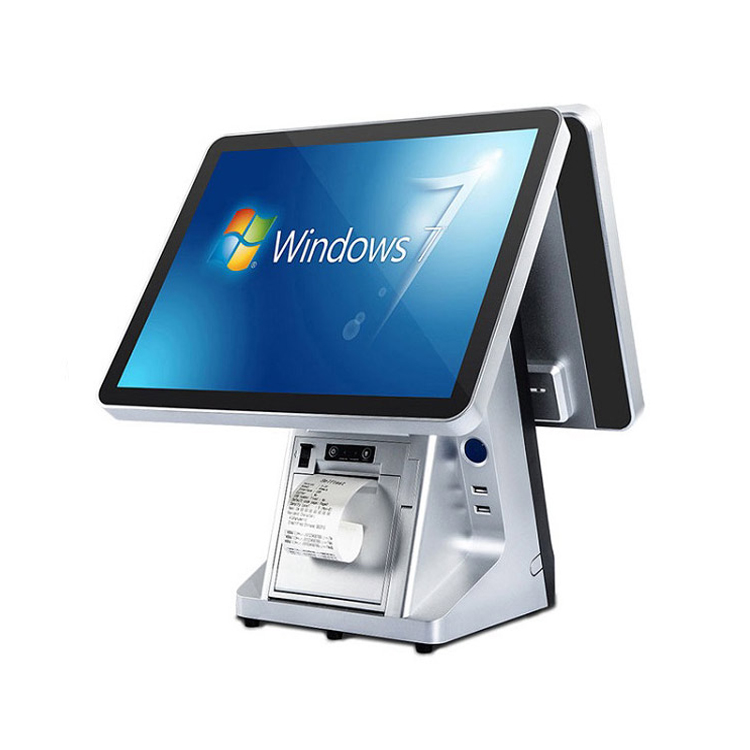
| Type | MJ POS7820D |
| Optional Color | Black/ White |
| Main Board | 1900MB |
| CPU&GPU | Intel Celeron Bay Trail-D J1900 quad core 2.0 GHZ |
| Memory Support | DDR3 2GB (default) Optional:4GB,8GB |
| Internal Storage | SSD 32GB (default) Optional:64G/128G SSD |
| Primary Display& touch(default) | 15 inch TFT LCD/LED + Flat screen capacitive touch screen |
| Second display(Optional) | 15 inch TFT / Customer Display (non touch) |
| VFD Display | |
| Brightness | 350cd/m2 |
| Resolution | 1024*768(max |
| Built-in Module | Built-in Thermal Printer: 80mm or 58mm |
| Support Optional | |
| WIFI, Speaker,Card Reader optional | |
| View Angle | Horizon: 150; Vertical :140 |
| I/O port | 1* power button 12V DC in jack*1; Serial*2 DB9 male; VGA(15Pin D-sub)*1; LAN:RJ-45*1; USB(2.0)*6; RJ11; TF_CARD; Audio out*1 |
| Operating temperature | 0ºC to 40ºC |
| Storage temperature | -20ºCto 60ºC |
| Compliance | FCC Class A/CE Mark/LVD/CCC |
| Packing dimension/ Weight | 410*310*410mm / 7.6 Kgs |
| OS | Windows7 beta version(default)/Windows10 beta version |
| Power adapter | 110-240V/50-60HZ AC power, Input DC12/5A out put |

| Operating System | Windows/Android |
| Screen | 11.6-inch screen, 1366*768 pixels |
| Touch | 10-point capacitive touchscreen |
| CPU | i3 Gen3 or J41254 |
| Memory | 4GB+128GB/8GB+128GB |
| Scanner | 1D/2D scanner |
| size | 32*58*30cm |
| Color | black |

|
Type
|
15.6 inch Windows All-in-One POS Terminal
|
|
Product Name
|
MJ-G300
|
|
Optional Color
|
Black/White
|
|
mainboard model
|
N97
|
|
CPU
|
Intel ®Allder Lake-N Series Processor 3.6GHz
|
|
Memory Support
|
DDR4 8G up to 16G
|
|
Hard
|
64G/128G/256G/512G
|
|
Main screen LCD
|
15 inch Resolution 1024*768,15.6 inch Resolution 1366*768
|
|
environment humidity
|
Ambient humidity: 0~95% air humidity, no condensation.
Ambient humidity : 0~95% air humidity, non-condensing |
|
Touch Screen
|
Flat 10 point capacitor Taiwan Yili G+FF tempered panel A+ panel
|
|
system
|
Windows 10
|
|
I/O
|
USB*4 Ethernet port*1 DC*1 com*1 Hundred megabit RJ45 network port Support WIFI-2.4G/5G Bluetooth 5.0
|
|
Operating temperature
|
0~60 degrees
|
|
Storage temperature
|
-20~75 degrees
|
|
Ethernet
|
Ethernet, 10M/100M
|
|
WIFI
|
4G/5G Built-in WIFI Bluetooth 5.0
|
|
horn (automobile etc)
|
4 ohm 2 watt
|
|
operating frequency
|
60Hz
|
|
power supply
|
Output: 12v/5A Input: 100-240v
|

| Product Name | H10P Handheld POS Machine |
| OS |
Android 14 |
| Processor | MTK6765 Octa-core. up to 2.3Ghz |
| Display | 5.5" HD+. lncell. l 440x720. IPS |
| Memory | 3GB RAM + 32GB ROM. DDR4 |
| Camera | Rear 9.0MP Auto Focus with Flash LED Support l D/2D |
| Printer |
Built-in 58mm thermal printer Speed: 80mm/s |
| Scanner |
D/2D barcode Scan Module |
| Dimensions | 219 x 80 x 17.9 mm |
| Weight | 345g |
If you have any interest or query during the selection or use of any pos machine , please Click the link below send your inquiry to our official mail (admin@minj.cn) directly! MINJCODE is committed to the research and development of pos equipment technology and application equipment, our company has 14 years of industry experience in the professional fields, and has been highly recognized by the majority of customers!
POS equipment Reviews
Lubinda Akamandisa from Zambia:I was looking for a POS system that would fully meet the needs of my small business, and this system is exactly what I was looking for. Its flexibility and scalability gives me confidence that my business can thrive as it expands. I sincerely appreciate the convenience and efficiency this system has brought to my business.
Amy snow from Greece:Choosing this POS system was one of the wisest decisions I've ever made. It not only improves our sales efficiency, but also helps us to better manage our inventory and analyze sales data. The stability and user-friendliness of this system impressed me so much that I have no hesitation in recommending it to other B2B sellers.
Pierluigi Di Sabatino from Italy:This POS system makes my sales team's work easy and fast. Its excellent customer management features have helped us better interact with our customers and improve customer satisfaction. It's definitely a wise investment for a small business like ours.
Atul Gauswami from India:We as a small business, are very happy with our choice of this POS system. Its excellent inventory management and sales reporting features have given us greater insight into our business operations, which has improved our efficiency and accuracy. We highly recommend it to other B2B sellers!
Jijo Keplar from United Arab Emirates:This POS system is truly a savior for my business! Its ease of use and powerful features make my transactions flow smoothly. The customer service team is always on hand to support me whenever I have a problem. I feel very satisfied and at ease with my choice.
angle Nicole from United Kingdom:This is a good purchasing travel, I got what I expired. That is it. My clients give all “A” feedback, thinking I would order again in the near future.
Application Scenarios
Different food truck formats require different hardware layouts. We help you review terminal and peripheral options against your counter space, application requirements, power arrangement and maintenance needs. Final suitability depends on the selected configuration and sample evaluation.

Food Trucks
For a fixed checkout counter, consider a touchscreen terminal with either an integrated or separate receipt printer. Check the complete installation footprint, including the base, cable connections and paper-loading space. Position the equipment away from cooking heat, grease and areas exposed to splashes.

Coffee Trucks
Coffee truck counters often need to accommodate drink preparation and checkout equipment within the same workspace. Compare compact terminal layouts and printer placement without obstructing the preparation area. Confirm screen visibility, cleaning requirements and access for replacing receipt paper.

Ice Cream Trucks
For ice cream truck projects, review the installation location, available power and potential exposure to moisture or condensation. Select hardware according to its documented operating limits rather than assuming that a standard POS terminal is suitable for every vehicle environment. Confirm display visibility at the serving window during sample evaluation.

Fast Food Trucks
For burger, barbecue and other fast-service formats, evaluate the terminal and receipt printer using your expected order and printing workload. Check touch response, receipt output, paper replacement and peripheral communication with your actual application. Hardware performance should be assessed as part of the complete checkout setup.

Dessert Truck
For dessert trucks and branded mobile counters, consider how the terminal, printer and optional customer display fit the available space and presentation requirements. Discuss logo placement, enclosure colours and packaging where applicable. Customer-facing content depends on your application and display configuration.

Catering Event Truck
For catering and event deployments, review setup time, cable identification, transport protection and access to replacement hardware. If several vehicles use the same configuration, document the approved terminal, peripherals and accessories so your team can repeat the installation consistently.
Build a Food Truck POS Hardware Setup
A food truck POS installation may require more than a touchscreen terminal. Depending on your software and checkout workflow, you may need a receipt printer, barcode scanner, cash drawer, or other compatible peripheral.
MINJCODE supplies multiple POS hardware categories that can be reviewed together for a procurement project. The final hardware combination depends on the required interfaces, power arrangement, physical space, and application compatibility.
1.Touchscreen POS Terminal
The terminal provides the computing platform and operator display. Confirm the operating system, processor, memory, storage, available interfaces, and mounting requirements.
For a fixed checkout layout, consider the MJ-POS7650 countertop POS terminal as a candidate. Confirm the current configuration, peripheral connections and installation dimensions against your project requirements.
2.Thermal Receipt Printer
A separate or integrated receipt printer may be required for customer receipts or other supported print jobs. Check paper width, printing interface, driver or command compatibility, power supply, and access for paper replacement.
3.Barcode Scanner
If your workflow involves packaged products, inventory identification, or barcode-based transactions, select a scanner that supports the required barcode formats and host interface.
4.Cash Drawer
Where cash handling is required, verify the drawer dimensions, connection method, electrical triggering requirements, and compatibility with the selected printer or POS terminal.
Hardware Configuration Checklist
|
Component |
Buyer Requirement |
Verification Before Ordering |
|
POS terminal |
Screen size, operating system, performance |
Exact model and software test |
|
Receipt printer |
Paper width and print workflow |
Driver, interface, paper handling |
|
Barcode scanner |
Required 1D/2D codes |
Host connection and sample scans |
|
Cash drawer |
Size and opening method |
Electrical and physical compatibility |
|
Power supply |
Vehicle electrical arrangement |
Input requirements and power budget |
|
Network connection |
Ethernet or wireless requirements |
Supported interfaces and actual environment |
|
Mounting and cables |
Space, access, and cable routing |
Installation drawing and sample fit |

Which Hardware Configuration Fits Your Food Truck Project?
A product that performs well in a standard retail store may still require additional checks before being installed in a food truck. Counter space, available power, heat exposure, cable routing, and equipment movement can affect the final installation.
We recommend evaluating these factors before approving a model.
|
Project Requirement |
Hardware Selection Priority |
Buyer Verification |
|
Limited counter space |
Compact footprint or integrated peripherals |
Dimensions, cable clearance, service access |
|
Frequent receipt printing |
Compatible integrated or external printer |
Driver, paper width, maintenance access |
|
Existing POS application |
Supported computing platform and interfaces |
Real application test on the sample |
|
Vehicle power constraints |
Known voltage and total power demand |
Power budget and approved supply arrangement |
|
Outdoor or semi-open service window |
Suitable display visibility and environmental limits |
Brightness, temperature, moisture exposure |
|
Multiple food trucks |
Repeatable hardware configuration |
Approved sample and batch change control |
|
Private-label distribution |
Branding and packaging feasibility |
Artwork approval and MOQ confirmation |
Food Truck Hardware Challenges — What to Check Before Ordering

Busy Service Periods and Receipt Printing
A short product demonstration may not reflect your busiest service period. Receipt length, print-job frequency, application behaviour and paper handling all affect the checkout workflow.
Before ordering: Run a representative sequence of orders and receipts on the sample. Check output quality, printing errors, paper replacement and recovery from interruptions. Use the results to agree on acceptance criteria.

Limited Counter Space
A terminal may fit on the counter while leaving too little room for cables, paper replacement or daily cleaning. An integrated printer can reduce the number of separate devices, but its enclosure and maintenance access still need to be checked.
Before ordering: Measure the available width, depth and height. Include connector clearance, screen adjustment and the space needed to open the printer cover. Compare the installation drawing with your actual counter layout.

Unstable Connectivity and System Recovery
Food trucks may operate at locations with different network conditions. Available Ethernet or wireless connections are hardware considerations; offline ordering, transaction storage and payment acceptance depend on your software and payment providers.
Before ordering: Test the selected configuration with your application under agreed disconnection, reconnection and restart conditions. Record what happens to pending orders and print jobs, and confirm payment-related behaviour with your provider.

Consistency Across Multiple Vehicles
Two terminals with the same model name may have different configurations. Changes to the motherboard, display, operating system, printer or accessories can affect installation and application compatibility.
Before ordering: Document the approved configuration and sample-test results. Agree on which changes require notification and review, then reconfirm the specification before repeat orders.
While these challenges are inherent to the food truck lifestyle, they can be overcome with the right tools and strategies—like MINJCODE's food truck POS solution. Ultimately, though, the key lies in finding creative solutions and maintaining a positive mindset amid the chaos.
POS Software Compatibility and Integration
MINJCODE supplies POS hardware rather than a complete food truck management software platform. Your software provider or integration team is responsible for confirming that the selected application, peripherals, and payment services work together.
We recommend checking compatibility at the model and configuration level before bulk procurement.
If your application requires Windows, review our Windows POS hardware options and confirm the required OS edition, version, architecture and peripheral drivers with your software provider.
What Your Integration Team Should Verify
|
Integration Area |
Required Information |
Acceptance Check |
|
Operating system |
Required OS version and architecture |
Application installs and runs as expected |
|
Computing resources |
Minimum CPU, RAM, and storage |
Application performance meets project criteria |
|
Touchscreen |
Required resolution and touch behavior |
Application interface works correctly |
|
Receipt printer |
Driver, interface, and print commands |
Test receipts print in the required format |
|
Barcode scanner |
USB, serial, or other supported mode |
Scanned data reaches the application correctly |
|
Cash drawer |
Triggering interface and electrical requirements |
Drawer opens through the intended workflow |
|
Network |
Ethernet, Wi-Fi, or supported external solution |
Connection behavior is tested on site |
|
Payment equipment |
Provider-approved terminal and integration method |
Payment partner confirms compatibility |
|
Recovery |
Restart, power interruption, and reconnection behavior |
Application and devices recover as required |
Hardware and Software Responsibility
MINJCODE hardware scope: Available POS terminals, specified peripherals, approved hardware configurations, and agreed product documentation.
Customer or software partner scope: POS application, menu management, online ordering, inventory functions, payment processing, software licenses, and application-specific integration.
Joint verification: Hardware compatibility, drivers, peripheral communication, sample acceptance, and any mutually agreed configuration requirements.
OEM/ODM Customization Options for Food Truck POS Hardware
For distributors, brand owners, and integration projects, customization may involve the hardware configuration, product appearance, accessories, packaging, and documentation.
The available options depend on the selected model, engineering feasibility, component availability, order quantity, and agreed requirements.
1.Branding and Private Labeling
Discuss logo placement, product labels, packaging artwork, manuals, and carton identification. Confirm marking methods and artwork approval before production.
2.Hardware Configuration
Review available processor platforms, memory, storage, displays, interfaces, and optional accessories for the selected product. Not every configuration is available on every model.
3.Peripheral and Accessory Selection
Confirm compatible receipt printers, scanners, cash drawers, cables, power supplies, and other required hardware. Interface compatibility must be tested rather than assumed.
4.Packaging and Project Documentation
Agree on packaging layout, product identification, manuals, language requirements, and any destination-market documentation needed for the order.
Project sequence: Requirements review → configuration proposal → sample and artwork approval → production confirmation → inspection → shipment.

Factory, Compliance and Support Evidence
You should be able to connect the quotation to the supplier, the hardware and the shipment. We manufacture POS hardware in Huizhou, Guangdong and provide OEM/ODM support; our published company more than 15 years of industry experience.
Start with our factory and production overview, then review the documents relevant to your proposed order.
|
Evidence |
What you should verify |
|
Supplier identity |
Contracting company, brand relationship and manufacturing location |
|
Current specification |
Data sheet and configuration matching the quotation |
|
Quality-system documents |
Named organisation, scope and current status |
|
Product conformity documents |
Applicable model, configuration, market and relevant reports |
|
Sample record |
Tests performed with your application and peripherals |
|
Batch records |
Agreed configuration, inspection and identification information |
|
Shipment documents |
Packing details and agreed export documentation |
|
Support terms |
Hardware troubleshooting route, warranty process and spare-part arrangements |

Wholesale Ordering Terms for Food Truck POS
Wholesale and OEM/ODM order conditions depend on the selected hardware model, configuration, quantity, customization requirements, and destination market.
Before approving a purchase order, confirm the technical specification and commercial terms in writing.
|
Purchasing Item |
What to Confirm with MINJCODE |
|
Minimum Order Quantity |
MOQ for samples, standard products, branding, and custom configurations |
|
Sample Availability |
Available models, sample configuration, charges, and shipping |
|
Bulk Quantity |
Initial order volume and expected repeat orders |
|
Lead Time |
Current stock, production schedule, and customization time |
|
Hardware Configuration |
Approved processor, memory, storage, OS, interfaces, and accessories |
|
OEM/ODM |
Logo, packaging, product labeling, and applicable setup requirements |
|
Payment Terms |
Accepted payment methods and agreed payment schedule |
|
Inspection |
Inspection scope, acceptance criteria, and available records |
|
Warranty |
Coverage period, exclusions, claim process, and freight responsibilities |
|
Compliance Documents |
Documents applicable to the selected model and destination market |
|
Shipping Terms |
Destination, transport method, Incoterms, and import responsibilities |
|
Repeat Orders |
Configuration consistency and change-notification arrangements |
Food Truck Hardware Project Workflow
A structured procurement process helps both teams confirm compatibility and reduce uncertainty before production.
1. Requirement Review
Share the intended installation, application requirements, hardware configuration, quantity, and destination market.
2. Model Shortlisting
Compare available terminals and peripherals against your technical and installation requirements. You can also review the MJ-A9 touchscreen POS terminal as an additional candidate, subject to confirmation of its current operating system, processor architecture, interfaces and sample-test results.
3. Sample Evaluation
Test the proposed configuration with your POS software, peripherals, and intended power arrangement.
4. Configuration Approval
Document the approved hardware, software environment used for testing, accessories, packaging, and acceptance criteria.
5. Commercial Confirmation
Agree on the quotation, quantity, production schedule, inspection arrangements, warranty, and shipping terms.
6. Production and Shipment
Confirm the agreed inspection scope, approved configuration, packaging, and shipment documentation.
7. Repeat-Order Review
For additional batches, verify that the approved specification remains applicable and that any changes have been reviewed.

Have a Special Requirement?
Have a Special Requirement?
Generally, we have common pos machine products and raw materials in stock. For your special demand, we offer you our customization service. We accept OEM/ODM. We could print your Logo or brand name on pos machine body and color boxes. For an accurate quotation, you need to tell us the following information:
Clients
We collaborate closely with clients across various industries, including retail, hospitality, logistics and warehousing, healthcare, restaurants, supermarkets...
FAQs for food trucks pos
A food truck POS system is a point-of-sale solution designed specifically for food truck operations. It manages orders, accepts payments, tracks sales, and even handles inventory, all from a compact and portable device. This system is particularly well-suited for mobile food truck operations, aiming to improve efficiency and enhance the customer experience.
Potentially, if the selected hardware configuration meets the software requirements. Compatibility should be tested using the exact operating system, drivers, interfaces, and application version before bulk deployment.
Receipt printing is supported for cash payments.
The choice depends on counter space, power availability, software requirements, printer arrangement, and peripheral connections. Compare available models and validate the proposed configuration with a sample.
Branding and packaging requirements can be reviewed for OEM/ODM projects. Availability, approval requirements, and minimum quantities depend on the model and customization scope.
Mainstream systems employ “recipe-based inventory tracking” to precisely control ingredient consumption.
Certification and test-document availability should be checked for the exact model and configuration. Buyers should verify whether the documents meet their destination-market requirements.
Standard products can start from one unit for evaluation. Selected customisation options typically start from 50 units, while packaging or other changes may require different quantities. Confirm each item in the quotation.
MINJCODE offers these hardware categories. The actual product selection and compatibility with your terminal and software should be confirmed for each project.
Other POS equipment


Buying Guide: Key Considerations for Food Truck POS Systems
Working in a food truck often means operating in confined spaces and potentially dealing with unstable signals, so the requirements for a POS system differ slightly from those for regular restaurants or cafes. Here are the key points to consider when selecting one:
⚪Hardware Portability: Most food trucks lack space for large desktop terminals, so look for vendors offering compact, portable hardware. App-based POS systems are particularly well-suited for mobile kitchens.
⚪Offline Capability: If your truck operates in areas with unreliable Wi-Fi or cellular signals, choosing a POS system with offline functionality is crucial. This ensures all daily sales records are securely saved regardless of network conditions.
⚪Marketing Tools: For mobile food trucks appearing at various events, a POS system with built-in marketing and loyalty tools proves invaluable. It helps promptly notify customers of your location and incentivizes visits.
⚪Mobile & QR Ordering: Allowing customers to order online or via QR codes can significantly boost sales, as many prefer picking up their food after ordering rather than waiting in line. Opt for systems with built-in capabilities or third-party app integration.
⚪Order numbers or ready notifications: On busy days, customers may prefer to leave and return when their order is ready rather than wait onsite. A system that prints numbered tickets or sends SMS/email alerts when orders are ready simplifies tracking for both you and your customers.
Innovative Food Truck POS Solutions
For over 10 years, MINJCODE has provided food truck professionals with high-performance tools designed specifically to meet your needs. Our touchscreen cash registers are designed to simplify your daily management and improve the customer experience.
·Optimizing Food Truck Management
MINJCODE offers pos solutions that address the specific challenges of the restaurant industry. Our food truck POS systems offer the following key features:
Order and Location Management: Easily assign orders and track customer locations to ensure efficient service.
Real-Time Inventory Tracking: Optimize replenishment processes, reduce losses, and ensure ingredient freshness.
Detailed Sales Analytics: Help you understand customer habits and adjust your menu and pricing strategies.
Flexible and Intuitive Tools
Our food truck POS solutions comply with tax regulations to ensure compliance. Food truck operators can focus on improving the customer experience while maintaining financial transparency and traceability. Choosing a MINJCODE cash register gives you a tool that helps you quickly process orders, reduce errors, and improve communication between restaurant and kitchen staff. Our devices are subscription-free, cost-effective, and regularly updated to incorporate the latest innovations. Whether you run a food truck, bar, food truck, or snack bar, our POS software adapts to the size and needs of your establishment. With menu, package, and installment management, you can optimize every step of your operation.
Who uses the food truck POS system?

Cooks/Culinary Staff:
Responsible for preparing and cooking all food served in the food truck. They input orders into the system to track ingredient requirements, monitor inventory levels, and ensure swift meal preparation and delivery.
Cashiers:
Responsible for receiving customer payments and entering them into the POS system. They input customer orders to ensure all sales are accurately processed.
Delivery Drivers:
Responsible for delivering orders placed online or by phone. Drivers use the POS system to track deliveries, payment details, and other data associated with each order.
Service Staff:
Assist customers with in-store or phone orders, handle inquiries, answer menu questions, and process returns or exchanges when necessary. These users need to understand how to operate the POS system to efficiently serve customers.
Food Truck Owners:
Primarily responsible for maintaining profitable operations, tracking profits and losses, and managing inventory levels. Owners may also utilize loyalty programs and marketing campaign features within the POS system to increase revenue potential.