

The retail industry has undergone tremendous change over the past few decades. Point-of-sale (POS) systems have played a key role in this transformation. From the clanking sound of cash registers to the quick touch screen clicks of MINJCODE's state-of-the-art terminals, it's safe to say that the evolution of POS systems has shaken things up. In this article, we'll travel back in time to follow this fascinating journey.
1. The birth and development of traditional POS systems:
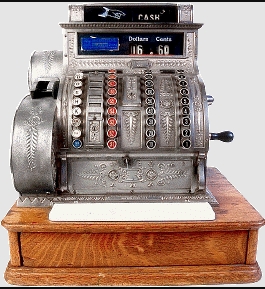
Traditional cash registers first appeared in the United States in the late 1800s, when a mechanical device called the "shop cash register" was introduced. The way sales were recorded and cash deposited was by pushing a button or pulling a handle, and these machines would place the cash in a drawer. Although these cash registers were seen as technological innovations at the time, they had some limitations. Firstly, using these machines required manual entry of each transaction, which slowed down the speed of transactions. Secondly, these traditional cash registers had limited storage capacity and could not store price information for a large number of items. In addition, their functionality is simpler and cannot meet complex business requirements, such as inventory management.
Traditional POS systems have the following advantages: firstly, they can accurately record sales data, making the recording of sales data more precise; secondly, they facilitate inventory management to keep track of inventory; and lastly, they can improve transaction tracking capabilities, making it easy to trace back transaction information. However, these systems are relatively slow and can lead to transaction congestion, especially during peak trading hours. Storage capacity is limited and cannot meet the needs of large retailers. In addition, there are some limitations in terms of functionality expansion and customizability.
As technology continued to advance, the first electronic POS systems were created in the 1970s. Merchants can gain many advantages and benefits by using computers and software to process transaction data. Firstly, mobile payments have greatly accelerated the speed of transactions, allowing customers to complete the payment process more quickly. Second, these systems have greater storage capacity and data processing capabilities, allowing more product information and transaction records to be stored. E-POS systems give merchants several important features, such as inventory management, sales reporting and financial accounting. These features help merchants to run and manage their business better. The introduction of this technology has created a huge buzz in the market, especially in the retail industry. The introduction of POS systems has greatly reformed the cashiering method, providing a more efficient and convenient transaction experience for both merchants and consumers. With time, POS systems continue to change and further integrate new technologies such as mobile payment and contactless payment, bringing more business opportunities.
If you have any interest or query during the selection or use of any barcode scanner, please Click the link below send your inquiry to our official mail (admin@minj.cn) directly! MINJCODE is committed to the research and development of barcode scanner technology and application equipment, our company has 14 years of industry experience in the professional fields, and has been highly recognized by the majority of customers!
2. Changes brought about by networked POS systems:
With the popularity of the Internet, traditional POS systems are gradually being networked, also known as networked POS systems. Networked POS systems have brought about tremendous changes and many benefits for both merchants and customers. First and foremost, networked POS systems allow data to be synchronized in real-time. This means that no matter which terminal a transaction or data update occurs on, the system can synchronize it instantly, ensuring that the data on all terminals is up to date. Secondly, networked POS systems enable remote management, allowing merchants to remotely monitor and manage the business operations of multiple points of sale via the Internet, further improving management efficiency and flexibility. Finally, networked POS systems are generally more secure and can provide encryption protection, data backup and disaster recovery, helping merchants protect transaction data and customer information.
A real-life example is that of a world-renowned restaurant chain that has implemented a networked POS system in its stores located in different parts of the world. According to their feedback, the implementation of a web-based POS system has greatly improved their productivity and customer experience. Firstly, the real-time synchronization of data enables them to have a better understanding of the stock status of their stores and to adjust their purchasing plans more quickly to ensure timely delivery of goods. Secondly, the remote management function allows them to monitor the operation of each store from the head office, understand the sales situation in real-time and make decisions and adjustments. In addition, the networked POS terminal provides a more reliable transaction environment with enhanced security and stability.
Another example is a retail chain. After implementing a web-based POS system, they found it easier to conduct promotions and membership management, and the networked POS system enabled them to make real-time adjustments to their pricing and promotion strategies, as well as instant access to member data and member point redemption, thus improving the customer experience and increasing customer loyalty.
All in all, the benefits of networked POS systems are clear and they are changing the way the retail and F&B industries operate, creating more efficient workflows for merchants and a more convenient and secure shopping experience for customers.
3. The rise of mobile and sensorless payment
The popularity of mobile payments has had a significant impact on POS systems. While traditional POS systems use card swiping, card insertion or cash for transactions, mobile payments use smartphones or other mobile devices to make payments, making the payment process more convenient, faster, secure and trustworthy. In recent years, mobile payment products such as Cloudflash, Alipay and ApplePay have grown rapidly, changing not only the way people pay but also, to some extent, the way POS are used.
The popularity of mobile payments has impacted POS systems in the following ways
Hardware upgrades: Merchants need to upgrade the hardware equipment of the POS system to meet the needs of mobile payments. Upgrades include adding NFC-enabled card readers and terminals to make it easier for customers to pay with their mobile phones or other mobile devices.
Software system upgrades: POS system software must be upgraded to support and integrate mobile payment-related functions to ensure that customers can complete transactions using Alipay, ApplePay and other mobile payment products.
With the popularity of mobile payment, POS systems need to improve the security of payment data to protect customers from having their personal and private information compromised. We may need to enhance encryption and protection measures for the transmission and storage of data related to mobile payments.
The benefits of mobile payments are
Convenience: Customers can use their mobile phones to make payments without having to carry cash or bank cards, simplifying the payment process.
Security: Mobile payments typically use a variety of authentication and encryption technologies, which can better protect customers' payment information and prevent information leakage and fraud during the payment process.
The mobile payments market is expanding and the number of users is growing rapidly. According to Statista, the number of mobile payment users worldwide is expected to reach 200 million by 2021 and grow to 273 million by 2023. Global mobile payment transactions are also expected to reach $35 trillion by 2022.
With the proliferation of mobile and digital payment methods, POS systems have been upgraded with hardware devices and software systems to meet the needs of today's consumers. Modern POS systems not only provide a faster and more secure payment experience but also help merchants track inventory, manage customer relationships and enable data analytics, among other functions.To purchase POS hardware direct from the manufacturer, please contact us on
Phone: +86 07523251993
E-mail: admin@minj.cn
Official website: https://www.minjcode.com/
If You Are in Business, You May Like
Recommend Reading
Post time: Jan-04-2024