
Omnidirectional Barcode Scanners for Wholesale & OEM Projects
If you are sourcing scanners for retail checkout counters, customer-facing QR code scanning, or integrated POS equipment, we recommend evaluating the actual barcode types, host interfaces, installation dimensions, and sample performance before selecting a model for bulk procurement.
Our desktop scanner range includes hands-free and presentation-style configurations. Available features and customization options depend on the specific model.
Omnidirectional barcode scanner
For omnidirectional scanner procurement, we recommend confirming the exact scanning engine, supported barcode symbologies, host interface, installation dimensions, and sample performance before placing a bulk order.
Our team can review available scanner configurations and OEM/ODM requirements for your project. Model specifications, customization feasibility, production terms, and applicable compliance documents should be confirmed for the selected product.
Omnidirectional Barcode Scanner Models
Different checkout and integration projects require different scanning formats. A desktop scanner for a cashier-operated POS counter may not be the right configuration for a customer-facing QR code station or an embedded self-service enclosure.
MINJCODE offers several desktop and hands-free barcode scanner products. Compare the available models below and request current specifications for the configurations you are considering.
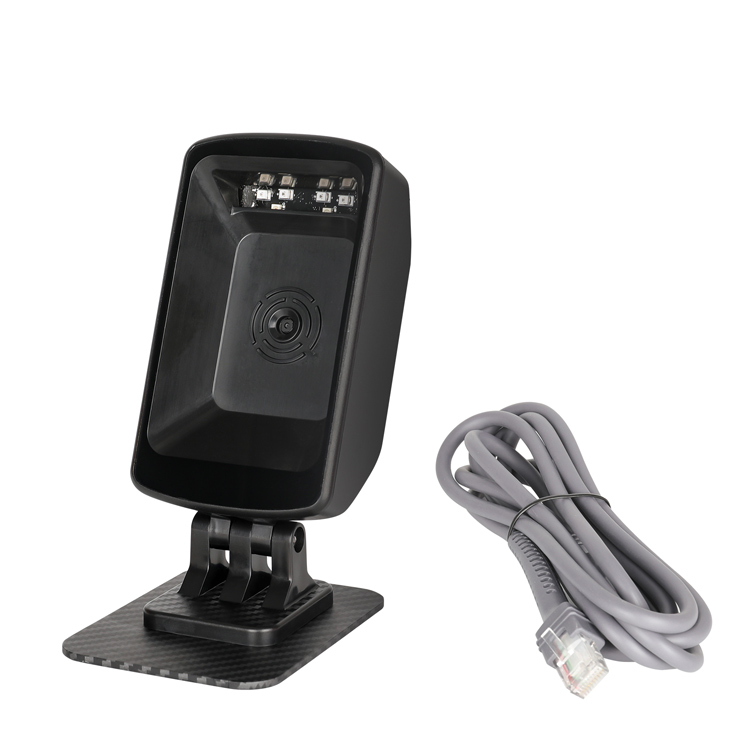

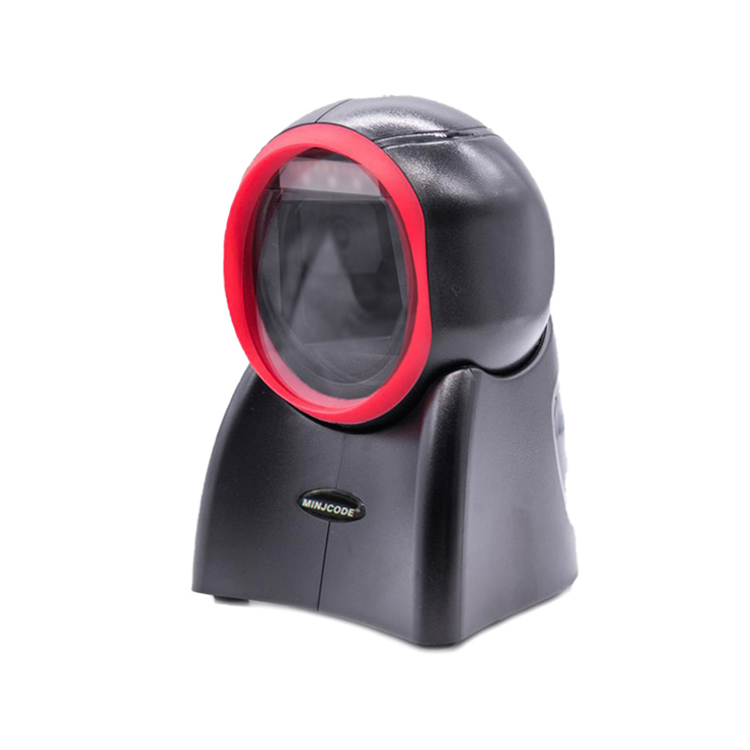

If you have any interest or query during the selection or use of any bar code scanner, please Click the link below send your inquiry to our official mail (admin@minj.cn) directly! MINJCODE is committed to the research and development of bar code scanner technology and application equipment, our company has 15 years of industry experience in the professional fields, and has been highly recognized by the majority of customers!
2D Omnidirectional Barcode Scanner Reviews
Lubinda Akamandisa from Zambia:Good communication, ships on time and product quality is good. I recommend the supplier
Amy snow from Greece:very good supplier that is good at communication and ships on time
Pierluigi Di Sabatino from Italy:professional product seller received great service
Atul Gauswami from India:Supplier commitment she full full in a time and very good approached to customer .quality is really good .i appreciate work of team
Jijo Keplar from United Arab Emirates:Great product and a place where customer requirement is completed.
angle Nicole from United Kingdom:This is a good purchasing travel, I got what I expired. That is it. My clients give all “A” feedback, thinking I would order again in the near future.
Choose a Scanner Format for Your Application
Start with how the barcode reaches the scanner. The right format depends on whether a cashier presents products, a customer presents a phone, or the scanner is installed inside another device.
Match the Format to the Scanning Task
|
Scanning task |
Format to evaluate |
Main approval check |
|
A cashier presents packaged products |
Desktop presentation scanner |
Item movement, barcode position and usable reading area |
|
A customer presents a membership or ticket code |
Customer-facing desktop scanner |
Phone position, screen reflection and code size |
|
The scanner sits inside a kiosk |
Integration-ready fixed-mount configuration |
Mechanical fit, window position, power and service access |
|
Items cannot easily reach the scanning window |
Handheld scanner or another accessible arrangement |
Operator reach and handling of large items |
|
Several checkout stations use the same setup |
Standardised desktop configuration |
Approved hardware, settings, cable and installation reference |
Check the Installation Before Selecting the Enclosure
Measure the available counter area and cable clearance. For an enclosed installation, also check the distance between the scanner and any protective window, the viewing angle and access for maintenance.
A desktop enclosure should not be treated as an embedded module simply because it fits inside the equipment. Test the proposed installed position before approving the design.
If the scanner must sit behind a panel or inside a kiosk, review our fixed-mount barcode scanner options before committing to a desktop enclosure. Share the mounting drawing, protective-window material and service-access requirements so the proposed arrangement can be assessed.
When This Range Needs Further Assessment
Long-distance rack scanning, moving conveyors, direct-part marking and exposed outdoor environments require separate product assessment. Workload alone does not establish suitability: barcode condition, scan distance, movement and environmental exposure also matter.

Scanning Performance and POS Integration Requirements
For a barcode scanner distributor or POS integrator, reliable performance depends on the combination of the scanner, barcode samples, host equipment, and operating environment.
We recommend testing the scanner against your actual project requirements rather than relying only on general statements such as “fast scanning” or “wide compatibility.”
Barcode and Reading Performance
|
Parameter |
What You Should Verify |
|
Barcode symbologies |
Required UPC/EAN, Code 128, QR Code, Data Matrix, PDF417, or other formats |
|
Printed barcode quality |
Label contrast, print size, damage, curvature, and reflective surfaces |
|
Smartphone scanning |
Display brightness, screen protectors, QR size, and scanning orientation |
|
Reading distance |
Working distance for your actual barcode size and quality |
|
Field of view |
Effective scanning area at the intended presentation position |
|
Motion tolerance |
Performance when items or phones move through the reading area |
|
Read confirmation |
Available sound or visual indicators and configuration options |
Host Interface and Data Output
|
Integration Requirement |
Acceptance Check |
|
USB connection |
Confirm supported USB operating mode |
|
Serial interface |
Verify availability and communication settings for the exact model |
|
Data format |
Test prefix, suffix, terminator, and required character handling |
|
Keyboard language |
Check output with the intended host keyboard layout |
|
POS software |
Verify that scanned data reaches the correct application field |
|
Power |
Confirm input requirements and host power availability |
|
Configuration |
Confirm how settings are applied and restored |
A scanner successfully reading a QR code does not automatically establish compatibility with every POS application. Your integration team should test the exact scanner configuration with the intended host system.

Test the Scanner Before You Approve the Order
Use the sample to answer the questions that a specification sheet cannot resolve. Test your actual barcodes, host application and installation position, then record the configuration that produced the result.
Prepare a Representative Barcode Set
Include the labels and screens your users will encounter, rather than only the clean demonstration codes supplied with the scanner.
|
Test group |
Examples to include |
What to record |
|
Everyday product labels |
Required formats, sizes and packaging surfaces |
Correct first reads and any re-presentation |
|
Difficult labels |
Actual low-contrast, curved, wrinkled or damaged examples |
Which labels pass and under what conditions |
|
Phone-screen codes |
Typical phones, code sizes and brightness settings |
Reading position, retries and reflection problems |
|
Application output |
Real payloads entered into your application |
Missing characters, altered data or incorrect field entry |
|
Repeated items |
The same code held in view and deliberately presented again |
Unwanted duplicates and intended repeat reads |
|
Recovery |
Agreed disconnect, reconnect and restart tests |
Communication recovery and setting retention |
Check First-Read Success and Correct Host Output
For a defined test set, record the number of presentations and correct first-presentation reads. Also record missed reads, incorrect output and unintended duplicates.
Keep the barcode size, distance, lighting, presentation method and host configuration with the results. Without those conditions, a read-rate figure is difficult to compare.
A good-read sound is useful feedback, but approval should depend on the correct data reaching the intended application.

OEM/ODM Options: What Changes and What Must Be Approved
Define the requested changes before the sample is prepared. Branding, configuration and mechanical changes have different approval requirements, and not every option is available on every model.
Branding, Packaging and Documentation
Discuss logo placement, product labels, packaging, manuals and carton identification. Approve the artwork together with its position, marking method and language version.
Where a specific colour or finish is required, agree on the reference used for approval rather than relying only on a screen image.
Interface, Output and Feedback Settings
Specify the host connection, output format and available sound or indicator settings required by your project. We review these requests against the selected scanner.
Bluetooth, physical RS232, USB virtual serial and adjustable sound levels should be confirmed individually. A feature offered on one model should not be assumed on another.
Mechanical Changes Need a Separate Review
Changes to the housing, mounting arrangement or scanning-window position require engineering assessment. Confirm any tooling, sample, testing and documentation implications before adding the change to the production order.
|
Requested change |
Approval reference |
|
Logo or product label |
Artwork, placement and marking sample |
|
Packaging or manual |
Approved file and version |
|
Colour or finish |
Agreed physical or colour reference |
|
Output settings |
Configuration record and host test |
|
Interface or cable |
Exact specification and compatibility result |
|
Housing or mounting |
Drawing, engineering review and revised sample |

Define Batch Consistency Before Production
For a repeatable deployment, the model name is only part of the specification. Include the hardware revision, firmware/settings reference and accessories in the approved order documents.
|
Control point |
What to agree |
|
Hardware baseline |
Model, revision, sensor/decoder configuration where relevant, housing and cable |
|
Firmware and settings |
Approved version and host/output configuration |
|
Sample reference |
Identification of the approved sample and associated tests |
|
Component changes |
Which substitutions or revisions require notification and review |
|
Revalidation |
Tests affected by a proposed hardware or firmware change |
|
Identification |
Agreed serial or lot references for receiving and support |
|
Batch inspection |
Test method, sampling scope and acceptance criteria |
|
Packing |
Correct cable, manual, labels and accessories |
|
Repeat orders |
Availability review and confirmation against the previous baseline |
Clarify Hardware and Integration Responsibilities Before Deployment
For POS integration projects, scanner performance depends on more than the scanning hardware. The host device, operating mode, application behavior and installation conditions can all affect the final result.
We recommend agreeing on the technical responsibilities before the sample is approved.
|
Project Area |
MINJCODE Hardware Scope |
Buyer or Integration Team Scope |
|
Scanner model |
Confirm available hardware specifications |
Define the scanning application |
|
Host interface |
Confirm model-supported connections and modes |
Verify host requirements |
|
Barcode decoding |
Provide model capabilities for review |
Supply representative barcode samples |
|
Scanner settings |
Confirm available configuration methods |
Define required data-output behavior |
|
POS application |
Provide relevant scanner interface information |
Validate application compatibility and data handling |
|
Installation |
Confirm available dimensions and mounting information |
Approve physical placement, power and cabling |
|
Sample acceptance |
Review agreed hardware test requirements |
Test the complete operating environment |
|
After-sales issues |
Review reported hardware problems under agreed terms |
Provide logs, samples and installation details |
Avoid an Integration Gap at Handover
Before a multi-store rollout, your team should be able to answer three questions:
·Which scanner configuration passed the reference test?
·Who maintains the POS application and host-side settings?
·What evidence must be collected if a deployed scanner stops working as expected?
MINJCODE supplies scanning hardware, not the customer's POS application. Software functionality and complete-system compatibility must be validated by the buyer or their integration partner.
Documenting these responsibilities helps prevent a software or host-configuration issue from being treated automatically as a scanner hardware defect.

Review Factory, Compliance and Support Evidence
You need documents that relate to the supplier, the scanner and the proposed shipment. MINJCODE manufactures scanning hardware in Huizhou, Guangdong and supports wholesale and OEM/ODM enquiries.
|
Evidence |
What you should check |
|
Supplier identity |
Contracting company, manufacturing location and relationship to the brand |
|
Current specification |
Exact model, revision, interface and cable |
|
Product documentation |
Applicable conformity information for the model and destination market |
|
Quality-system records |
Named organisation, scope and current status |
|
Sample evidence |
Actual-code, host-output and installation tests |
|
Batch evidence |
Agreed inspection and configuration records |
|
Support terms |
Warranty, diagnostics, repair/replacement and freight responsibilities |
|
References |
Customer/project materials that can be disclosed with permission |
Start with our factory overview, then request the records needed for your supplier qualification.
5 Hidden Costs in Omnidirectional Scanner Selection (and How to Avoid Them)
Interface Mismatch → Secondary Development Cost
A desktop scanner with USB-HID may not work with a POS system that expects a virtual COM port. Confirm the USB operating mode before ordering. If your software expects serial data, a USB-only model may require an additional driver or a different cable — both add cost and delay.
Scanning Window Size vs. Product Packaging
A small scanning window may require precise positioning of larger or irregular items. If your checkout handles bulk items (e.g., 5kg rice bags, large detergent bottles), measure the effective scanning area at the intended presentation position — not just the window dimensions on the datasheet.
Beep Volume vs. Store Environment
A high-volume beep that works in a warehouse becomes noise pollution in a pharmacy or library. Confirm whether the model supports adjustable beep volume (high/mid/low/mute) and whether the setting can be locked for repeat orders.
Firmware Lock-In → Supplier Dependency
If the firmware cannot be updated or the configuration tool is proprietary, a future change (e.g., adding a prefix for a new POS software) may require factory involvement. Ask: Can settings be applied and restored locally? Is the configuration manual provided?
“Same Model, Different Batch” Performance Drift
For repeat orders, the model name is not enough. Agree on hardware revision, firmware/settings reference, and approved sample ID in the order documents. Without this, a second batch may arrive with a different sensor or decoder configuration — and your integration tests no longer apply.
Wholesale Ordering Terms for Omnidirectional Scanners
Wholesale and OEM/ODM purchasing terms depend on the scanner model, quantity, customization scope, production requirements, and destination market.
We recommend confirming the following information in writing before approving an order.
|
Commercial Item |
What to Confirm |
|
MOQ |
Standard product, sample, and custom order requirements |
|
Sample terms |
Model availability, configuration, charges, and shipping |
|
Bulk order |
Quantity and expected repeat orders |
|
Lead time |
Production schedule and customization requirements |
|
Hardware specification |
Approved model, revision, interface, and accessories |
|
OEM/ODM |
Artwork, tooling, approval, and applicable quantities |
|
Payment terms |
Accepted methods and agreed payment schedule |
|
Quality inspection |
Inspection scope and acceptance criteria |
|
Warranty |
Coverage, exclusions, and claim procedure |
|
Compliance |
Documents applicable to the model and market |
|
Shipping |
Incoterms, destination, packing, and documentation |
|
Repeat orders |
Configuration consistency and change review |
How to Investigate Scanner Issues After Delivery
For distributors and system integrators, a scanner issue after delivery can affect more than one device. Before requesting replacement units, identify whether the problem is isolated to a scanner, a batch, or a particular host configuration.
We recommend collecting the same technical information used during sample approval.
Identify the Scope of the Problem
|
Situation |
Evidence to Collect |
What the Investigation Should Establish |
|
One scanner stops responding |
Model, unit identification, connection and observed behavior |
Whether the issue follows the scanner or the host |
|
Several scanners show the same symptom |
Affected quantity, lot information and configuration |
Whether the issue is linked to a shared configuration |
|
Scanning works but data is incorrect |
Sample barcode, output example and host details |
Whether the problem involves decoding, formatting or application handling |
|
Replacement units behave differently |
Approved sample reference and current hardware/settings |
Whether the configurations match |
|
Problems occur only at one location |
Installation, power, host and environmental information |
Whether site conditions affect operation |
Keep the Approved Sample as a Troubleshooting Reference
Where practical, retain an approved reference scanner and its configuration record.
When an issue is reported, compare the affected unit against the reference using the same barcode samples and host conditions. This helps distinguish a product-level difference from an installation or application issue.
Agree on the Support Procedure Before Shipment
Before placing the order, confirm the warranty scope, claim information, diagnostic responsibilities, repair or replacement arrangements, and any applicable shipping responsibilities.
If a recurring issue is identified, agree on the evidence and review process needed before the next production batch.
FAQs about Omnidirectional Barcode Scanner
It depends on the scanning technology and the specific model. Many 2D presentation scanners support common 1D and 2D symbologies, but compatibility must be verified against the current model data sheet.
They can be suitable for compatible POS terminals and applications. Confirm the scanner's host interface, operating mode, data output, and power requirements.
Installation depends on the scanner model, host interface and required operating mode. Some USB configurations may work with compatible hosts without additional drivers, while other integrations require interface settings, configuration codes or application-side testing.
USB is common for desktop POS integration, but other interfaces may be available on selected models.
Omnidirectional barcode scanners are used in industries such as retail, logistics and warehousing where large quantities of goods need to be scanned efficiently.
OEM/ODM options can be reviewed for selected products. Feasibility, minimum quantities, approval requirements, and production conditions depend on the customization scope.
When choosing an omnidirectional barcode scanner, it is important to consider factors such as scanning speed, compatibility with barcode types, range, and durability to ensure that the scanner meets the specific needs of your business.



Discuss Your Omnidirectional Scanner Project with MINJCODE
Send the scanning task and the requirements that matter most to your project. We will review the available hardware options and identify the specifications, sample checks and commercial details that need confirmation.
Why choose MINJCODE as your omnidirectional barcode scanner wholesaler?
Superior Quality You Can Trust: We are the top manufacturer in the industry, ensuring that every scanner is rigorously tested and certified for superior scanning speeds, powerful decoding capabilities, and exceptional durability to handle a variety of demanding environments. From entry-level to high-end models, we offer a full range of products to meet your diverse needs and budget.
Value pricing, better in bulk: our competitive wholesale pricing allows you to ensure quality while minimising purchasing costs. What's more, we offer flexible pricing strategies and step discounts, the larger the purchase volume, the more favourable.
Professional service, worry-free: from professional consultation to efficient order processing, to comprehensive technical support and after-sales service, our experienced team will accompany you throughout the whole process to ensure that you enjoy the best service experience throughout the procurement process, and answer any questions you have in a timely manner.
Adequate stock, fast delivery: We have sufficient stock to ensure that your orders can be processed and delivered in time. Close co-operation with a number of reliable logistics partners enables us to provide you with safe and efficient transport services.
Tailor-made to meet your needs: We understand that every customer's needs are unique. If you require customised branding, special interfaces or specific features, our team will work closely with you to create a tailor-made solution.

Benefits of utilising 2D desktop barcode scanners
1.Enhanced efficiency: china omnidirectional barcode scanner can swiftly and precisely scan 2D barcodes, such as QR codes and data matrix codes. This can significantly increase speed of data entry whilst reducing manual errors, resulting in better operational efficiency overall.
2.Versatility: These scanners can read a wide range of barcode types, making them suitable for various applications in industries including retail, logistics, and manufacturing. They are ideal for inventory management, product tracking, and point-of-sale operations.
3. Streamlined Workflow: Integration of 2D desktop barcode scanners into workflows helps in achieving seamless data capture and transfer, ultimately streamlining the overall process. This, in turn, enhances productivity and optimises resource utilisation.
4.Additionally, 2D handsfree barcode scanners make retrieving product information, inventory details and other English text data convenient, as the English text contained in the barcode can be easily captured and interpreted.
Using 2D desktop barcode scanners can deliver operational efficiency, accuracy and convenience to businesses when processing English content. Therefore, they are indispensable tools across a range of industries.
Future Trends and Advancements in Omni-Directional Barcode Scanners
The future holds significant advancements and developments for 360 degree barcode scanner. These scanners, capable of reading barcodes from any direction, are poised to become even more efficient and versatile.
One emerging trend is the incorporation of advanced imaging technologies, such as high-resolution cameras, image sensors, and sophisticated recognition algorithms. This technological integration will empower scanners to read barcodes from various surfaces and angles, including curved, reflective, or poorly printed barcodes.
Further development includes the miniaturization of these scanners, rendering them smaller and more compact while retaining their enhanced processing capabilities.
Moreover, the increasing prevalence of wireless connectivity integration will enable seamless interfacing with mobile devices and real-time data transfer.
The advancements in omni-directional scanners will elevate their accuracy, speed, and user-friendliness, establishing them as indispensable tools across a wide array of industries, including retail, logistics, and healthcare.